Dashainko Dakshina: 18% OFF on All Courses!
New
DaVinci Training in Nepal
Learn Video Editing, Storytelling & Professional Color Grading in DaVinci Resolve




Thousands of students have started their careers after getting certified by Broadway Infosys
Updated On: 07/04/2026
Created On: 07/04/2026
Course Overview
DaVinci Resolve is a widely used video editing and color grading software. The software is widely preferred by industry professionals and experts in post-production, cinematography, and broadcasting for its all-in-one editing, color, audio, and visual effects capabilities. At Broadway Infosys, we offer specialized professional training in DaVinci Resolve. Our focus is on producing professional video editors and colorists with a wide range of video production and color grading techniques. Students experiment with DaVinci Resolve in combination with audio, video, still images, photographs, and timelines.
Learners will be able to assemble video clips, control sequences, and optimize them using various transitions; apply professional color correction and grading; use audio tracks, fade tracks, and combine multiple audio tracks; and work with Fusion for visual effects and motion graphics.
Tools Covered
Some of the major industry-relevant tools you'll work with in this course include:
-
DaVinci Resolve
-
Fairlight
-
Fusion
-
OpenFX
-
Multicam
-
Photoshop
Students who got hired learning with us
Hear from graduates who have completed our courses.
College/Faculty: Patan College for Professional Studies / Bsc(Hons) in Software Engineering
Working At: NavaNexa Tech
Position: Front - End Developer
College/Faculty: University of Kurukshetra, India / B.Tech Computer Science & Engineering
Working At: Web Surfer Nepal Communication
Position: Network Administrator
College/Faculty: NCC / MBS
Working At: Radiant Digital Hub Pvt. Ltd.
Position: Content Writer
College/Faculty: National College / BCA
Working At: Mona Handicraft
Position: Graphics Designer
Our graduates are hired by 470+ companies in Nepal
Time for you to be the next hire. With our advanced and industry relevant courses, you are on the right stage to start your dream career.
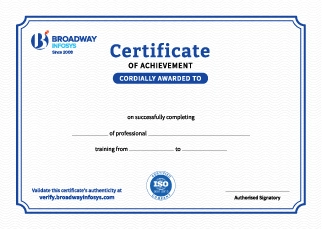
Earn a High Value Industry Certificate
Add this credential to your LinkedIn profile, resume, or CV to stand out to recruiters.
Already earned a certificate?
Verify it here
Frequently Asked Questions
No prior professional video editing experience is required. Basic computer knowledge and an interest in video production are enough to get started, making the training suitable for beginners.
Yes. The training covers DaVinci Resolve from the fundamentals and gradually introduces more advanced editing, color grading, audio, and visual effects techniques.
You will learn video editing, color correction and grading, audio post-production, visual effects, motion graphics, media management, and professional post-production workflows using DaVinci Resolve.
Yes. You will learn how to import and organize media, cut and edit footage, create transitions and effects, work with timelines, and export videos for different platforms.
Yes. The training covers color correction and color grading, including nodes, scopes, color balancing, look development, and techniques for achieving consistent and professional visuals.
Yes. You will learn the fundamentals of Fusion, DaVinci Resolve's node-based visual effects and motion graphics environment, for creating effects, compositing, titles, and animations.
Yes. The training covers Fairlight for audio editing and post-production, including audio cleanup, mixing, effects, and improving overall sound quality.
Yes. You will explore relevant DaVinci Resolve AI-powered tools and features that can assist with editing, object tracking, masking, audio processing, and other post-production workflows.
Yes. The training emphasizes hands-on learning through practical projects that allow you to apply editing, color grading, visual effects, and audio post-production techniques.
Yes. The practical projects you complete during the training can help you build a portfolio demonstrating your editing, color grading, visual effects, and post-production skills.
You will be able to edit videos, perform professional color grading, work with audio, create basic visual effects and motion graphics, and manage complete post-production workflows using DaVinci Resolve.
The training can help you pursue roles such as Video Editor, Colorist, Post-Production Editor, Motion Graphics Artist, Video Content Creator, or work as a freelance video editor.
You will receive trainer guidance throughout the course, including support with DaVinci Resolve tools, editing exercises, color grading, Fusion, Fairlight, practical projects, and portfolio development.
Yes. Depending on your requirements, you can discuss suitable schedules with the training team. One-to-one training and group-based learning options may also be available.
Our course is available in hybrid training mode. You can attend classes in person or join online, whichever works best for you. If you cannot attend in person on a particular day, you can simply join the class online instead.
The course pricing varies depending on the subject and level. For detailed information on the course price, please contact us directly: +977-9841002000 / +977-1-4111849. Our team will be happy to guide you or send us an email at [email protected].
Our syllabus outlines are only the headlines of the major modules. To ensure a complete understanding of the course, we offer free counseling. Also, if you have specific modules in mind, you can customize the course. Send your inquiry today!
Lesson 1: Mastering Video Editing, Color Grading & Fusion in DaVinci Resolve
- Introduction to Video Editing
- Introduction to DaVinci Resolve
- DaVinci Resolve Free vs Studio
- Setting Up a Video Project
- Introduction to the User Interface, Workspaces, Pages, Panels, and Tools
- Starting a New Project
- Project Settings and Timeline Resolution
- Importing Media Files
- Organizing Media Using Bins and Metadata
- Adding Graphics, Images, and Music
- Creating and Managing Timelines
- Saving, Backing Up, and Exporting Projects
- Importing Video Footage
- Organizing Footage in the Media Pool
- Understanding the Cut Page and Edit Page
- Creating Video Timelines
- Source Viewer and Timeline Viewer
- Insert, Overwrite, and Append Edits
- Selection, Trim, and Blade Tools
- Selecting and Moving Video Clips
- Trimming Video Clips
- Ripple, Roll, Slip, and Slide Edits
- Zooming on the Timeline
- Replace Edits
- Working with Compound Clips
- Working with Adjustment Clips
- Refining Video Timing and Positioning
- Dynamic Zoom and Basic Keyframing
- Understanding Audio Tracks and Channels
- Synchronizing Video and External Audio
- Adjusting Audio Levels
- Audio Fades and Crossfades
- Basic Equalization (EQ)
- Audio Effects
- Background Music Mixing
- Introduction to the Fairlight Page
- Changing Clip Speed
- Retime Controls
- Retime Curve
- Speed Ramping
- Freeze Frames
- Reverse Playback
- Optical Flow and Motion Estimation
- Introduction to the Color Page
- Primary Color Correction
- White Balance
- Exposure and Contrast
- Color Wheels
- Curves
- Color Scopes (Waveform, Parade, and Vectorscope)
- Color Matching
- Basic Color Grading Using Nodes
- Applying Video Transitions
- Refining Transition Effects
- OpenFX Effects
- Transform Controls
- Blur, Glow, and Stylize Effects
- Creating Custom Transition Effects
- Working with Adjustment Clips
- Introduction to Chroma Keying
- Delta Keyer in Fusion
- Removing Green Background
- Matte Cleanup
- Spill Suppression
- Adding Backgrounds
- Shadow and Edge Refinement
- Color Matching Foreground and Background
- Introduction to the Fusion Page
- Understanding Node-Based Workflow
- Creating Basic Motion Graphics
- Importing Layered Photoshop Files
- Text Animation
- Shape Animation
- Creating Two Motion Graphic Designs
- Basic Motion Tracking
- Working with Text and Text+
- Creating Lower Thirds
- Working with Fonts
- Shapes and Background Elements
- Keyframe Animation
- Title Animation
- Animated Callouts
- Combining Titles with Video Clips
- Creating Complete Video Projects
- Importing, Previewing, and Organizing Media
- Editing Interviews
- Multicam video Editing
- Adding B-Roll Footage
- Professional Color Correction
- Audio Mixing
- Adding Motion Graphics and Titles
- Exporting for YouTube, Facebook, Instagram, and Client Delivery
- Setting Up Multiple Cameras
- Camera Angles and Framing
- Lighting Setup
- Microphone Placement
- Recording Workflow
- Preparing Footage for Post Production



Upcoming Classes (7)
Why Video Editing with DaVinci Resolve?
Single Tool, Every Skill: Master editing, color grading, audio mixing, and VFX in one professional software, no juggling multiple programs.
Colorist-Level Grading: Learn primary color correction, color wheels, curves, and scopes, the same techniques top colorists use.
Fusion VFX & Motion Graphics: Node-based compositing, motion tracking, and custom motion graphics, go beyond basic cuts.
Green Screen to Final Delivery: Practice chroma keying, matte cleanup, and compositing, then export polished projects for YouTube, social, or clients.
Real Studio Experience: Work with multi-camera setups, lighting, and mic placement; the full production-to-post pipeline, not just editing software.
Quick Inquiry
Choose class schedule(s)
-
26 Oct 2026
-
02 Nov 2026
-
17 Nov 2026
-
22 Nov 2026
-
23 Nov 2026
-
24 Nov 2026
-
29 Nov 2026